
Troubleshooting Heating and Hot Water


If your heating or hot water is not working, there are a few simple checks you can do before reporting the issue. Many problems can be fixed quickly by following the steps below.
Please try these steps in order.
Check the thermostat

Make sure it is turned on
Set the temperature higher than the room temperature
Check it is set to heating, hot water, or both, depending on what you need
If your thermostat uses batteries:
Replace the batteries
Check the screen is working
Check the boiler has power

Check the boiler display has lights or numbers
Check the power switch near the boiler is turned on
Look for an isolation switch near the boiler and make sure it is on
If there is no power:
Check your fuse box or circuit breaker
Look for any switches that have tripped
Check the boiler pressure
Most boilers need water pressure to work.
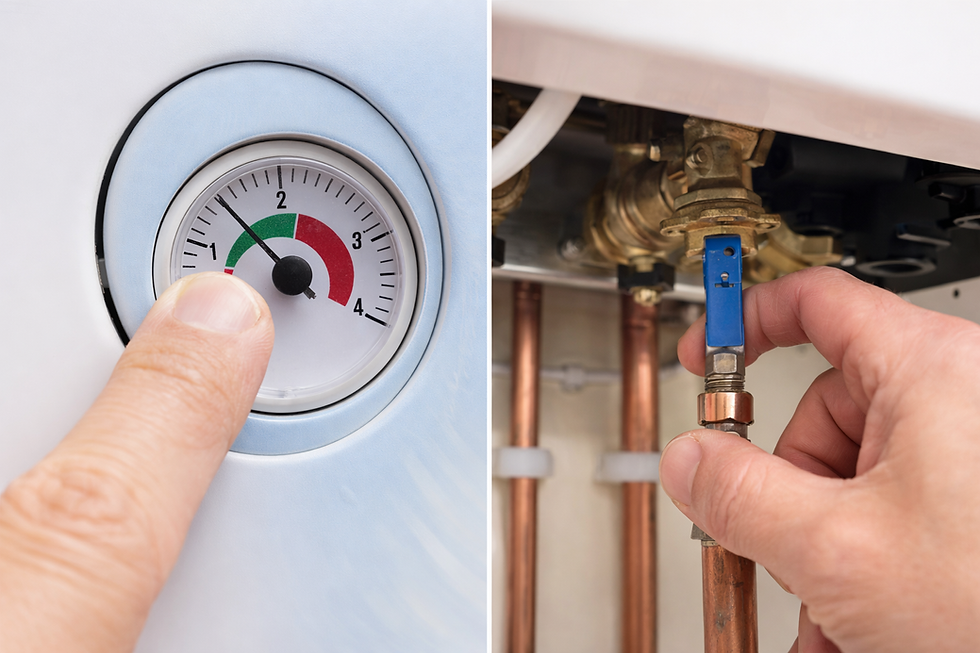
Normal pressure is usually between 1 and 2 bars
If the pressure is below 1 bar, the boiler may stop working
If pressure is low:
You may need to refill the system
Follow the instructions in your boiler manual
If you are not sure, do not guess - report the issue to Apex.
Reset the boiler
Many boilers have a reset button.

Press the reset button once
Hold it for 5–10 seconds if needed
Wait a few minutes for the boiler to restart
Do not press the reset button many times.
Check for error codes
Modern boilers often show an error code.

Look at the boiler display
Write down the code if you see one
You can:
Check the boiler manual
Search the boiler brand website
This can help explain the problem.
Check timer or programmer settings
If your heating works at some times but not others:
Make sure the time and date are correct
Check the heating and hot water programs are turned on
Make sure it is not set to “off” or “holiday mode”

Use online guides (if helpful)
You may find simple videos or guides online for your boiler model. Only follow trusted instructions and do not open the boiler when troubleshooting heating and hot water issues.

Troubleshooting Heating and Hot Water Has Not Worked: When should I report the issue to Apex?
Please report the issue if:
Heating or hot water does not work after these checks
You have no heating and no hot water
There is a leak from the boiler or pipes
You see repeated error codes
You are unsure or feel unsafe
Need help or want to report an issue?
Contact Apex Property Management.
PROPERTY MANAGEMENT
📞 0203 304 241
📱 Whatsapp: 0794 648 3266
Comments